 By Lauren Holland
Updated November 2026
Online shopping for cool gadgets is easy to start and easy to regret if you skip a few checks. This guide walks you through the steps that help you find clever, well-made tech, avoid knockoffs, and pick items that match how you actually live and work.
Start With a Clear Use Case
Before you search, decide what problem the gadget should solve. A desk gadget, a pocket tool, and a home device each call for different features, sizes, and power sources. Write down the one or two tasks you want it to handle. That single sentence will filter out most of the noise. If you are still browsing ideas, a curated roundup such as What Are Some Cool Gadgets Worth Owning? 12 Clever Picks can help you see what is out there.
Shopping for one? See our guide: Cool Gadgets for Camping: 8 Best Picks for Every Campsite (2026).
Check the Specs That Matter for Your Use
Product listings often lead with flashy features. Look instead for the details that affect daily use: dimensions, weight, battery capacity, charging standard, and materials. A gadget that is 12 millimeters too thick may not fit your pocket or your phone case. Manufacturers usually list these specs in the product details section, so read past the headline bullet points.
Verify the Seller and the Listing
Stick with the brand’s official storefront or an authorized retailer whenever possible. Compare the product photos against the manufacturer’s own site, and be wary of listings that use stock images with no real packaging shots. Owners often report that counterfeit chargers and batteries are the biggest risk in this category, so check the brand name spelled correctly and the model number against the official catalog.
Read Reviews Strategically
Skip the five-star and one-star extremes and look at the three-star reviews. They tend to describe real trade-offs, like a button that feels mushy or an app that needs updates. Search reviews for words tied to your use case, such as “battery life,” “fit,” or “noise.” Also check when reviews were posted, since firmware changes can fix or break a device months after launch.
Confirm Compatibility Before You Buy
Many gadgets only work with certain phones, tablets, or operating systems. Check the required OS version, the connection type (Bluetooth version, USB-C, or Lightning), and whether an app is needed. Compatibility mistakes are the most common reason people return gadgets. If your gadget will sit on a desk, our notes on Cool Work Desk Gadgets: 7 Clever Picks for a Sharper Workspace show how to think about size and cable routing.
Your Pre-Purchase Checklist
- Write down the one task the gadget must do.
- Note the size, weight, and power limits that fit your setup.
- Confirm the seller is the brand or an authorized retailer.
- Check compatibility with your devices and OS version.
- Read three- to four-star reviews that mention your use case.
- Look up the return window and warranty terms before checkout.
Common Mistakes to Avoid
- Buying on looks alone without checking dimensions.
- Ignoring the return policy until something breaks.
- Trusting listings with no model number or manufacturer details.
- Buying multiple gadgets that do the same job.
- Skipping firmware updates after setup.
Recommended Gear for Smarter Buying
A few accessories make owning gadgets easier. A small cable organizer keeps charging cables from tangling on your desk. View on Amazon
A short USB-C cable with a known charging rating helps you avoid the cheap, unreliable chargers that often come bundled with listings. View on Amazon
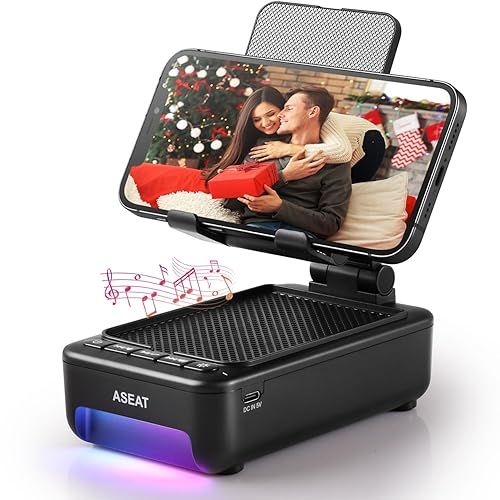
A phone tripod or stand is useful for testing and filming gadget demos or setting up a desk display. View on Amazon
FAQ
How do I know if a cool gadget is a knockoff?
Compare the product photos, packaging, and model number against the manufacturer’s official site. Listings with blurry images, misspelled brand names, or no warranty information are common warning signs.
Should I buy gadgets from marketplace sellers or brand stores?
Brand stores and authorized retailers usually offer clearer warranties and genuine parts. Third-party sellers can be fine, but verify the seller’s return policy and the product’s authenticity first.
What if a gadget does not work as expected?
Check the return window first, then contact the seller or manufacturer support with your order number and a short description of the problem. Keep the original packaging until you are sure the device works.
Conclusion
Good online shopping for cool gadgets comes down to a clear use case, careful spec and compatibility checks, and a healthy skepticism toward listings. Follow the checklist above and you will spend less time returning items and more time enjoying the ones that fit. Check each manufacturer’s official site for current warranty and return terms before you order.
Related reading
Ready to choose one?
About Lauren Holland
Lauren Holland is part of our editorial team and reviews and edits our cool gadgets & EDC tech guides, checking product details against manufacturer specifications and owner feedback.