 By Lauren Holland
Updated November 2026
The latest tech gadgets and innovations tend to fall into a few useful categories: devices that save time, tools that reduce clutter, and small inventions that solve a problem most people didn’t realize they had. This guide shows you how to spot the good ones, what to check before you buy, and which kinds of new products are worth a closer look. By the end, you’ll have a repeatable way to evaluate any new gadget.
Start With the Problem, Not the Product
Most new gadgets are solutions looking for a problem. Before you get excited about a launch, write down one specific task that annoys you. Maybe your desk cables are a mess, your phone battery dies by mid-afternoon, or you keep losing your keys. A useful gadget removes friction from a task you already do. If you can’t name the task, the device is probably a novelty.
Shopping for one? See our guide: 6 Best Latest Tech Gadgets for Men: Our Picks Compared (2026).
Check the Innovation Behind the Gadget
Innovation often hides in a single feature rather than the whole device. Look for changes in how the product works, not just how it looks. Common examples include:
- Wireless charging that uses magnetic alignment to hold a phone in the right spot
- Ultra-wideband chips that help small trackers locate items within a few feet
- Foldable or compact designs that cut desk or bag space in half
- Smart plugs and sensors that report usage data through a companion app
When a manufacturer highlights a new feature, ask whether it changes your daily routine or just adds a number to the spec sheet. For a broader view of what’s emerging, see Tech Gadgets of the Future: 5 Best Picks Worth Reading About in 2026.
Evaluate Compatibility and Ecosystem Fit
A gadget that doesn’t work with your phone, laptop, or home setup will frustrate you quickly. Use this quick checklist before buying:
- Confirm the device works with your phone’s operating system and version.
- Check whether it needs a dedicated app, and whether that app is actively maintained.
- Look for standard connections such as USB-C, Bluetooth, or Wi-Fi, which tend to age better than proprietary ones.
- Read the manufacturer’s stated support period for software updates.
- Confirm what happens to the device if the company stops supporting it.
Ecosystem fit matters most for smart home and wearable devices. If you’re shopping for a particular household or lifestyle, Latest Tech Gadgets for Home: 3 Best Picks Compared (2026) shows how these comparisons play out in practice.
Weigh Durability, Battery Life and Repairability
Newer doesn’t always mean longer lasting. Manufacturers often specify battery cycle ratings, water resistance levels such as IP67 or IP68, and warranty length. Read those numbers rather than relying on marketing language. Battery replacement is a common weak point, so check whether the battery is user-replaceable or sealed. For portable gear, the same questions apply, and Tech Gadgets for Travel: 8 Clever Picks That Make Trips Easier offers useful examples of how these factors affect everyday use.
| Factor | What to look for | Why it matters |
|---|---|---|
| Software support | Stated update period in the product listing | Keeps security and features current |
| Battery | Rated cycle count and whether it is replaceable | Determines how long the device stays useful |
| Connectivity | USB-C, Bluetooth version, or Wi-Fi standard | Improves compatibility with future devices |
| Water resistance | IP rating listed by the manufacturer | Protects against rain, spills and dust |
Recommended gear
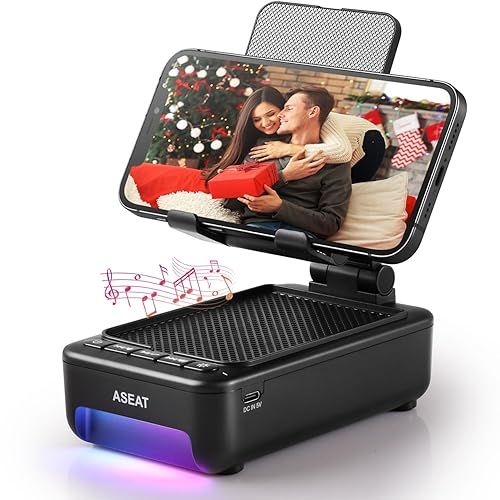
Several categories of new gear reward careful shopping. Smart desk organizers with built-in wireless charging help cut cable clutter, and a magnetic wireless charging stand works well for hands-free video calls. A compact tracker helps you find keys or a bag when you need it.
- Wireless charging stand for desk use: View on Amazon
- Bluetooth item tracker for keys and bags: View on Amazon
- Compact USB-C power bank for travel: View on Amazon
Common Mistakes to Avoid
- Buying the first version of a brand-new category before reviews and software updates settle.
- Ignoring the app. Some devices are only as good as the software that runs them.
- Stacking several single-purpose gadgets when one multi-function device would do.
- Skipping the return policy and warranty terms before you buy.
- Assuming a feature works well just because it’s advertised.
FAQ
How can I tell if a new tech gadget is worth buying?
Start by naming a specific problem it solves in your routine. If the device removes a real annoyance and works with what you already own, it’s likely worth considering.
Are brand-new gadgets safe to buy?
Buy from established retailers, check for recognized safety certifications, and read the warranty terms. For devices that charge or connect to your home power, consult a qualified electrician or the manufacturer if you have questions about installation.
Should I wait for a gadget to get updates before buying?
Often, yes. Waiting a few months lets early software bugs surface and gives you a clearer picture of long-term support, especially for smart home and wearable devices.
Conclusion
The best way to navigate the latest tech gadgets and innovations is to start with a real problem, then check compatibility, durability, and support. A new feature only matters if it fits how you actually live and work. Use the checklist above on every purchase, and you’ll avoid most of the regret that comes with impulse buys.
Related reading
- Top 4 Latest Tech Gadgets for Teens Worth Considering in 2026
- Latest in Tech Gadgets: 6 Clever Picks Worth Knowing About in 2026
- Latest Tech Gadgets for Her: 7 Clever Picks and How to Choose (2026)
Ready to choose one?
About Lauren Holland
Lauren Holland is part of our editorial team and reviews and edits our cool gadgets & EDC tech guides, checking product details against manufacturer specifications and owner feedback.