 By Lauren Holland
Updated November 2026
Smart gadgets for mobile range from simple desk stands to devices that track faces, read your heart rhythm, or turn your phone into a universal remote. This list focuses on six products that solve a clear problem, have consistent listing details, and fit the way people actually use their phones. Selection criteria: practical use case, clarity of what the product does, compatibility with common phones, and the kinds of pros and cons owners tend to mention.
Our top picks at a glance
- 1
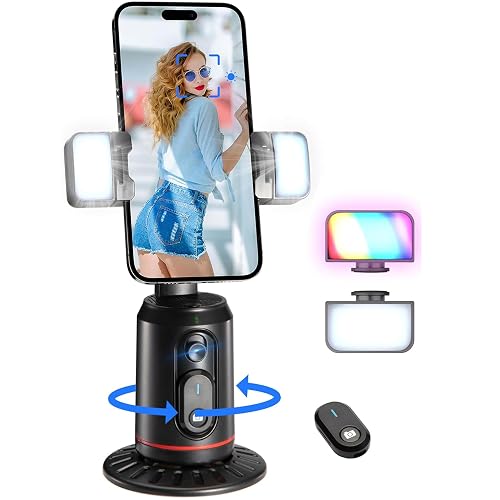 TOP CHOICEBest overallAuto Face Tracking Phone Holder, 360° Rotation Face Body Phone TripodView on Amazon
- 2
 TOP CHOICEBest for hands-free videoCrienten Auto Face Tracking Tripod, 360° AI Face Tracking Phone Holder with Remote, No AppView on Amazon
- 3
 TOP CHOICEBest for health monitoringKardiaMobile 1-Lead EKG Monitor, Detects Normal AFib & ArrhythmiasView on Amazon
- 4
 Best for desk setupsCell Phone Stand, Adjustable Angle Height Phone Stand for Desk, Fully FoldableView on Amazon
- 5
 Best for charging safety2PCS Innovative Overcharge Protection Adapter for iPhone 15-18/Mobile Phones/laptopsView on Amazon
- 6
 Best for home entertainmentUSB-C IR Blaster for iOS & Android Smartphone All in One Remote ControllerView on Amazon
Our Top Picks
Quick Comparison
| Product | Best for | Key feature |
|---|---|---|
| Auto Face Tracking Phone Holder | Vloggers and streamers | 360° rotation, face tracking |
| Crienten Auto Face Tracking Tripod | Hands-free video | AI tracking, no app |
| KardiaMobile 1-Lead EKG Monitor | Heart rhythm checks | Detects AFib and arrhythmias |
| Cell Phone Stand | Desk use | Adjustable angle, foldable |
| Overcharge Protection Adapter | Safer charging | Automatic physical disconnect |
| USB-C IR Blaster | Universal remote control | Controls TVs and AC units |
Auto Face Tracking Phone Holder, 360° Rotation Face Body Phone Tripod Smart Shooting Camera Mount with Rechargeable Remote and Light for Live Vlog Streaming Video
Auto Face Tracking Phone Holder, 360° Rotation Face Body Phone Tripod Smart Shooting Camera Mount with Rechargeable Remote and Light for Live Vlog Streaming Video, Rechargeable
Best for: Vloggers and streamers who want the frame to follow them.
This suits creators who shoot solo and want to move around without manually repositioning the phone. Owners often describe the rotation as smooth enough for walking shots.
Pros
- 360° rotation keeps you centered in frame
- Includes a rechargeable remote for start and stop
Cons
- Tracking can lag in low light
Crienten Auto Face Tracking Tripod, 360° AI Face Tracking Phone Holder with Remote, No App
Crienten Auto Face Tracking Tripod, 360° AI Face Tracking Phone Holder with Remote, No App,Smart Phone Stand for iPhone & Android, Rechargeable Tripod for Video Recording, Live Streaming, TikTok, Vlog
Best for: Hands-free video without installing another app.
A good fit for people who want setup to be quick and who record at a desk or tabletop. Buyers often mention that skipping an app keeps the process simple.
Pros
- No app required, works with iPhone and Android
- Rechargeable base suits frequent recording
Cons
- Limited tracking range compared with larger rigs
KardiaMobile 1-Lead EKG Monitor, Detects Normal AFib & Arrhythmias
KARDIAMOBILE 1-Lead EKG Monitor, Detects Normal AFib & Arrhythmias, HSA&FSA
Best for: Tracking heart rhythm at home and sharing readings with a clinician.
This is a health-focused gadget for people who want a quick single-lead reading on their phone. For health-related decisions, consult a physician.
Pros
- Single-lead readings take about 30 seconds
- Pairs with a companion phone app for record keeping
Cons
- Not a substitute for medical diagnosis
Cell Phone Stand, Adjustable Angle Height Phone Stand for Desk, Fully Foldable
Cell Phone Stand,Adjustable Angle Height Phone Stand for Desk,Fully Foldable/Portable Phone Holder with Silicon Pad for iPhone 16/15/14/13/12/Smartphones,All Mobile Phones (Black)
Best for: Desk setups where the phone needs to sit at eye level.
Useful for video calls, reading recipes, or following along with a video tutorial. Owners often note that the silicone pad keeps the phone from sliding.
Pros
- Fully foldable for travel
- Works with most phone sizes, including large models
Cons
- Thick cases may not sit securely
2PCS Innovative Overcharge Protection Adapter for iPhone 15-18/Mobile Phones/laptops
2PCS Innovative Overcharge Protection Adapter for iPhone 15-18/Mobile Phones/laptops/Headphones/Other USB-C Devices, Fully Charged Automatic Physical Disconnect Adapter for Funny Gifts, 140W Type-C
Best for: Charging overnight with an extra layer of protection against overcharging. You may also like Smart Gadgets for Android: 6 Best Picks Compared (2026).
This suits people who regularly leave devices plugged in. The adapter is designed to physically disconnect once the device is full.
Pros
- Automatic physical disconnect when charging completes
- Two-pack covers multiple devices
Cons
- Works only with USB-C connections
USB-C IR Blaster for iOS & Android Smartphone All in One Remote Controller
USB-C IR Blaster for IOS & Android Smartphone All in One Remote Controller for TV/AC/DVD for Samsung/Sony/Panasonic and More IR Blaster Universal Remote Controller for iOS & Android Phone
Best for: Turning a phone into a universal remote for TVs and air conditioners. We also found 6 Best Smart Gadgets for Motorcycle Riders Compared (2026) useful on this point.
Helpful for households with several legacy remotes that have been lost or worn out. Compatibility depends on the brands and models you own.
Pros
- Controls many TV and AC brands from one app
- Plugs into USB-C without extra batteries
Cons
- Infrared range is limited to line of sight
Buying Guide
Match the Gadget to Your Main Use
Start with the job you want done. A tracking tripod suits video creators and livestreamers, a desk stand suits everyday viewing and video calls, a remote adapter suits people who want to control home electronics, and a health monitor suits those tracking heart rhythm. Choosing by purpose keeps you from paying for features you will never use.
Check Phone Compatibility
Look at which phones the product says it supports, including model range and whether it works with both iPhone and Android. Also confirm the size and weight limits for stands and tripods, since oversized phones or cases can shift the grip or balance. A quick check of the listed compatibility saves frustration after delivery.
Consider Power and Charging Needs
Some gadgets run on rechargeable batteries, while others draw power from your phone or a charger. If you plan to use a device for long sessions, such as streaming or vlogging, make sure its battery and charging method fit your routine. For charging accessories, confirm the connector type and the power rating so your phone and cables are protected.
Think About Portability and Setup
If you travel or move between locations, a foldable stand or compact tripod is easier to carry than a heavier setup. Consider how quickly the gadget sets up and whether it needs an app or extra steps. Simpler setups tend to be easier to use day to day.
FAQ
Do these gadgets work with both iPhone and Android?
Several of the picks are listed as compatible with both iPhone and Android, while others name specific models or platforms. Always check the compatibility details on the listing before buying. That way you can confirm your exact phone works with the product.
Do I need an app to use a smart phone tripod?
Some tracking tripods work without an app, controlled through a remote, while others rely on an app for extra settings. If you prefer to avoid installing software, look for a model described as app-free. Checking the setup requirements beforehand helps you avoid surprises.
Can a health monitor replace a doctor’s advice?
A heart rhythm monitor can help you track readings and share information with your healthcare provider, but it is not a substitute for medical care. Anyone with symptoms or concerns should speak with a doctor. Treat the device as a tool to support, not replace, professional guidance.
Will a universal IR remote work with all my TVs and devices?
An IR blaster works with many TVs, air conditioners, and DVD players, especially those from common brands, but coverage varies by model. Check the list of supported brands before buying. Keep in mind that devices using only Bluetooth or Wi-Fi control may not respond to infrared signals.
Is an overcharge protection adapter safe to use with any USB-C device?
These adapters are designed for USB-C devices and aim to cut power once a device is fully charged. Confirm that the wattage and connector type match your device and charger. Following the manufacturer’s instructions helps keep both your phone and accessories safe.
How do I keep a phone stand from slipping?
Many desk stands include a silicone pad to hold the phone in place, which helps reduce sliding. Setting the stand on a flat, clean surface also improves stability. Adjust the angle and height carefully until the phone sits firmly.
Conclusion
If you create videos or stream often, a face tracking tripod is the most useful pick, and an app-free model suits those who want simple control. For everyday desk use, a foldable, adjustable phone stand offers an affordable and portable option. People who want to control home electronics from their phone will benefit most from the USB-C IR blaster, while those focused on heart rhythm tracking should consider the KardiaMobile monitor alongside medical advice. Anyone who charges multiple USB-C devices may appreciate the overcharge protection adapter for added peace of mind.
Related reading
- Wholesale Smart Kitchen Gadgets: 7 Steps to Source Them Well (2026)
- Website to Buy Cool Gadgets: 6 Steps to Shop Smart and Safe
- Versatile Utensils Smart Gadgets: 6 Clever Picks and How to Choose Them
- Unique Smart Gadgets Tagore Garden: 6 Clever Picks Worth Knowing
- Top 6 Smart Gadgets for Travel Worth Considering in 2026
- Top 5 Smart Gadgets for Pets: Clever Picks for Every Pet Owner
- Top 10 Smart Health Gadgets: Clever Picks for Tracking Your Well-Being (2026)
- The Gadgets Hub Smart Watch: A Buyer's Guide to Choosing One
About Lauren Holland
Lauren Holland is part of our editorial team and reviews and edits our cool gadgets & EDC tech guides, checking product details against manufacturer specifications and owner feedback.


