 By Audrey Hayes
Updated November 2026
Smart appliances gadgets for every home in India can be chosen with a simple method: start with the daily chores that waste the most time, check whether your home network and power supply can handle the device, and pick products that work with the ecosystem you already use. This guide walks you through that process so you buy devices you will actually use.
Start With the Chores That Eat Your Time
The best smart gadget is the one that removes a task you repeat every day. Look at your routine for a week and note the moments you feel rushed, forgetful or stuck. Common examples in Indian homes include switching off lights and fans when you leave, monitoring the water tank, cooking rice or dal without standing over the stove, and keeping track of the kitchen while you work.
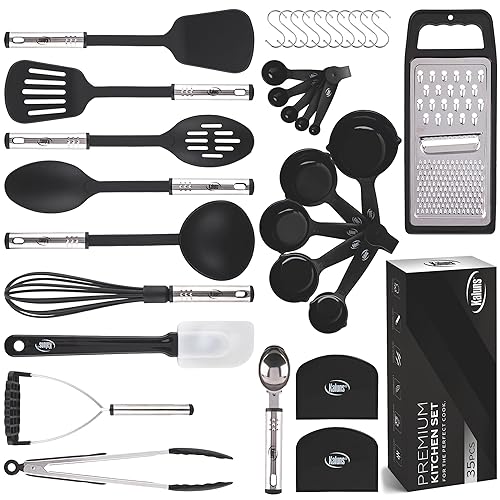
Shopping for one? See our guide: New Gadgets Smart Appliances Kitchen Utensils for Every Home: 3 Best Picks.
Once you have three or four targets, match them to device types. A smart plug handles older appliances, a motorised curtain or a sensor handles lighting, and a connected kitchen appliance handles cooking. Our guide on Smart Gadgets to Make Life Easier: 7 Clever Picks for Daily Tasks covers that kind of task-first thinking in more detail.
Check Power, Wi-Fi and Voltage Before You Buy
Indian homes vary a lot in voltage stability and router coverage, so check these before you order anything. A few points matter most: A related read: Gadgets by Use Case: Home Office, Travel, Smart Home Starter Kits and Budget Accessories.
- Confirm whether the device runs on 2.4 GHz Wi-Fi. Many smart plugs and bulbs do not support 5 GHz networks.
- Check the rated load on smart plugs. Heaters, geysers and induction cooktops draw far more current than a fan or lamp, so use a plug rated for the appliance or skip plugs for high-draw devices.
- Use a stabiliser or surge protector for sensitive electronics, especially in areas with frequent fluctuations.
- Test Wi-Fi strength in the room where the device will sit. A weak signal causes more smart home complaints than any other single issue.
For plug-based setups, our article on Smart Plug Safety and Setup in the Home explains load limits and installation habits that prevent overheating.
Pick One Ecosystem and Stick With It
Devices from different brands often refuse to talk to each other, which is frustrating and expensive in time. Choose a primary app or assistant that supports the brands you want, and check compatibility before buying. Owners often report that a small, consistent set of devices is easier to manage than a large mixed collection.
If you are starting from zero, a hub or a single well-supported platform simplifies everything. Smart Home Hubs: What They Do and Do You Need One explains when a hub helps and when it is unnecessary.
Smart Gadgets by Room
Plan your first purchases room by room so each device has a clear job. The table below shows a practical starting point.
| Room | Useful device type | Main benefit |
|---|---|---|
| Living room | Smart plug or LED strip controller | Schedule lights and fans |
| Kitchen | Connected water or gas leak sensor | Early warning of leaks |
| Bedroom | Smart bulb with timer | Gradual wake-up lighting |
| Bathroom | Motion-activated night light | Safer night trips |
| Entrance | Video doorbell or door sensor | Know who is at the door |
For room-specific picks, see Smart Gadgets for Bedroom: 7 Clever Picks for Better Sleep and Smart Gadgets for Bathroom: 8 Clever Picks That Make Daily Routines Easier.
Common Mistakes to Avoid
- Buying a device before checking Wi-Fi coverage in that exact room.
- Connecting high-wattage appliances to a standard smart plug.
- Ignoring app privacy settings and default passwords. Change them on day one.
- Adding too many devices at once, which makes troubleshooting hard.
- Skipping a stabiliser where voltage swings are common.
Recommended Gear
- Smart plug with energy monitoring: Useful for switching fans, lamps and chargers on a schedule and seeing which appliances draw the most power. View on Amazon
- Voltage stabiliser for home electronics: Protects TVs, routers and smart hubs from fluctuations common in many Indian cities. View on Amazon
- Wi-Fi extender or mesh node: Extends coverage into rooms where smart devices drop offline. View on Amazon
FAQ
Do smart appliances work during power cuts?
Most do not, unless they have their own battery or backup. Devices with local control may keep working, but cloud-dependent gadgets usually stop until power and internet return.
Can I use smart gadgets without a broadband connection?
Some devices can run on a local network or mobile hotspot, but many features need internet access. Check the manufacturer’s specifications before buying.
Are smart plugs safe for geysers and heaters?
Only if the plug is rated for that load. High-power appliances can overheat standard plugs, so consult a qualified electrician before connecting them to any smart switch or plug.
Conclusion
Smart appliances gadgets for every home in India work best when you start with a real daily problem, confirm your power and Wi-Fi, and keep your setup simple. Choose a small number of compatible devices, then expand as you find what saves you time. A measured approach gives you a smarter home without the clutter.
Related reading
Ready to choose one?
About Audrey Hayes
Audrey Hayes is part of our editorial team and reviews and edits our cool gadgets & EDC tech guides, checking product details against manufacturer specifications and owner feedback.